

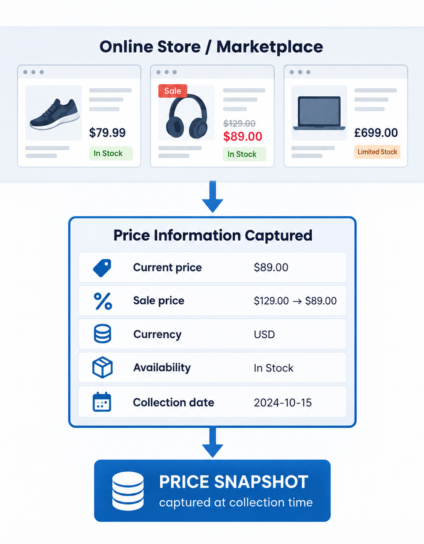
Every online source presents prices in its own way. A store might show one figure on a product page, a struck-through list price beside a sale price, or a different price for each size. A marketplace can show several prices for the same item, one for each seller.
Price scraping collects those displayed prices and returns them as structured data, so they can be read, sorted and compared in a spreadsheet, database or other system.
Price scraping captures the price displayed at the time of collection. It is a snapshot of one moment, taken from the sources you select.
A Price Snapshot, Not a Price History
A snapshot answers a simple question: what did this source display for these items when it was collected? The result is a dated set of prices that can serve as a current reference.
A price history is a different requirement. It needs the same prices collected again and again so they can be compared across dates, and that belongs to Price Monitoring. The comparison below shows where the line sits.
PRICE SCRAPING
Current snapshot: the prices a source displays when it is collected.
PRICE MONITORING
Repeated snapshots over time: price data collected over time to maintain a price history.
What Can Be Captured From a Price Display
Depending on the source, a price display can include:
- Current price: the price shown for the item when it is collected
- Original or list price: where the source shows one
- Sale price: where the item is marked down
- Discount information: an amount or percentage, where displayed
- Currency: the currency the price is displayed in
- Variant-level price: where options such as size or pack carry their own price
- Availability: where it affects how the price should be read
- Promotion information: where an offer or label appears beside the price
Only what a source displays can be captured. Anything it does not show is not available to collect.
Request a Data Collection Project
Prices Across Different Online Sources
The same price can look quite different depending on where it appears.
- Online stores: the price usually appears on the product page and again, in shorter form, on category listings. The two views can carry different levels of detail.
- Marketplaces: one listing can show a price for each seller, sometimes with shipping shown alongside where the marketplace displays it.
- Catalog and listing pages: summary views often show a single price, or a price range or starting price for items with options.
Because each layout is different, which price counts as the price for an item is settled when the project is defined.
When One Listing Shows More Than One Price
A single listing can display several prices at once, so the collection needs to record which price is which.
- Original and sale price: a list price shown next to a marked-down price, where the source shows both
- Variant prices: options such as size or pack that are priced differently
- Seller or listing prices: different offers for the same item, where the source displays them
- Currency presentation: symbols, codes and number formats that differ from one source to another
Each price is captured as the source displays it.
What a Price Dataset Can Look Like
A row in a price dataset can hold fields such as:
Product / Listing
Current Price
Original Price (if displayed)
Discount (if displayed)
Currency
Availability (where relevant)
Collection Date
Actual fields depend on the source and the requirements of the project.
Where needed, duplicate records, inconsistent formats and missing values are reviewed before delivery.
Point-in-Time Collection
A collected price reflects what the source displayed when it was accessed. Prices can change after that moment, so a snapshot describes that moment and nothing beyond it.
Where relevant to the project, a collection date can be retained with the data so it is clear when the prices were captured. If the requirement is repeated collection and a price history, that belongs to Price Monitoring.
When Price Scraping Fits the Requirement
Price scraping fits when the need is for:
- A current pricing snapshot from the sources you choose
- Displayed prices collected across selected sources
- Displayed prices from selected sources compared at one point in time
- A current price dataset to work from
- A refreshed price dataset, when a new snapshot is requested
When You Need Something Different
Some requirements sit outside a single price snapshot:
- Price Monitoring: repeated price tracking and price history
- Product Data Extraction: complete product records
- Ecommerce Data Scraping: broader ecommerce, store, marketplace and catalog collection
- Competitor Data & Intelligence: competitor-focused collection and intelligence
Define the Price Data You Need
A price scraping project is defined around the sources you want prices from, the pricing fields you need, the categories or listings involved, the point in time the collection should reflect, and the output format you prefer. Output can be CSV, Excel, JSON or database-ready, with API or data feed access where applicable to the project.
Send over the sources and the price fields you have in mind, even if the rest is still open.
Request a Data Collection Project